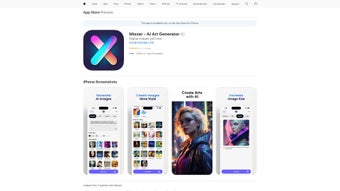

Download Mixxer – AI Art Generator, Free, Secure & Easy
Overview
Mixxer is an AI‑driven web application that turns simple text prompts or uploaded images into high‑quality artworks in seconds. Launched in August 2023, the platform blends state‑of‑the‑art machine‑learning models with an intuitive, browser‑based interface, allowing creators of any skill level to experiment with visual styles without installing bulky software. Whether you are looking to generate surreal landscapes, stylized portraits, or abstract compositions, Mixxer offers a “what‑you‑see‑is‑what‑you‑get” experience: type a description, pick a style, and watch the AI render a resolution‑ready image that can be downloaded, shared, or embedded directly into social feeds.
Because the heavy lifting occurs on secure cloud servers, the tool runs smoothly on low‑end laptops, tablets, and smartphones alike. Security is baked into the service – all data travels over HTTPS, and prompts are processed in memory without permanent storage unless the user opts to save them. Frequent model updates keep the artistic vocabulary fresh, and a free tier grants generous access to core features, making Mixxer a compelling entry point for hobbyists, educators, and professional designers who need quick visual mock‑ups or inspiration.
In short, Mixxer delivers a secure, cross‑platform, and cost‑effective solution for anyone who wants to explore AI‑augmented creativity without the overhead of traditional graphic‑design suites.
Key Features of Mixxer
- AI‑Driven Style Engine: Generates artwork in dozens of pre‑built styles, from classic oil painting to futuristic cyber‑punk, with the ability to blend multiple influences.
- Prompt‑Based Creation: Accepts concise text prompts or reference images, interpreting them through deep‑learning models to produce unique compositions.
- Real‑Time Brush & Texture Controls: Slider‑based adjustments let you fine‑tune brush size, stroke intensity, and texture granularity while the image renders.
- High‑Resolution Export: Offers PNG, JPEG, and PDF downloads up to 4K resolution, suitable for print, web, or NFT minting.
- Multi‑Platform Access: Fully web‑based; works on Windows, macOS, Android, and iOS browsers without additional installations.
- Secure Cloud Processing: All AI computations happen on encrypted servers, protecting user prompts and uploaded images.
- Version History & Undo: Keeps a chronological log of every iteration, allowing you to revert to earlier versions with a single click.
- Community Gallery: A built‑in showcase where users can publish creations, receive feedback, and discover trending styles.
- Regular Model Updates: New artistic models are added monthly, ensuring the tool stays aligned with the latest AI research.
- Free Tier with Optional Premium Upgrade: Core features are free; premium plans unlock faster rendering queues and exclusive style packs.
Installation & Usage Instructions (Including Compatibility)
Getting Started – No Download Required
Because Mixxer runs entirely in the browser, onboarding is as simple as visiting the site and creating an account. Follow these steps to start creating artwork:
- Open your preferred browser and navigate to www.mixxer.ai.
- Click “Sign Up” and register using an email address or a social login (Google, Apple, or Facebook).
- Confirm your email if prompted, then log into the dashboard.
- Select “Create New Artwork” from the main menu.
- Choose your input method:
- Prompt Text: Enter a short description such as “a misty sunrise over a quiet lake”.
- Image Upload: Drag and drop a photo to serve as a style reference.
- Pick a style from the sidebar or let Mixxer suggest one based on your prompt.
- Adjust brush, texture, and color sliders to personalize the output.
- Press “Generate”. The AI will render the image in a matter of seconds to a few minutes, depending on complexity and server load.
- When satisfied, click “Download” to save a PNG or JPEG file, or choose “Export as PDF” for print‑ready output.
Compatibility (Windows, macOS, Android, iOS)
Mixxer’s cloud‑first architecture guarantees consistent performance across a broad spectrum of devices and operating systems:
- Windows 10/11: Fully functional in Chrome, Edge, and Firefox.
- macOS 12+ (Monterey, Ventura): Optimized for Safari, Chrome, and Firefox.
- Android 8.0+: Works flawlessly in Chrome Mobile and Samsung Internet.
- iOS 13+ (iPhone & iPad): Seamless experience in Safari and Chrome for iOS.
The UI automatically adapts to touch or mouse input, and because rendering occurs on remote servers, even low‑spec devices can produce 4K artwork without slowdown.
Tips for Optimal Performance
- Use a stable broadband connection (minimum 5 Mbps) for the fastest rendering.
- Clear your browser cache periodically to avoid loading outdated assets.
- Enable pop‑up windows for the download dialog, especially when exporting high‑resolution files.
- Explore the Community Gallery for popular prompts that can inspire your own creations.
- If you encounter server‑side delays, consider upgrading to the premium plan for priority rendering.
Pros and Cons, FAQ & Conclusion
Advantages (Pros)
- Web‑based – no installation or heavy system requirements.
- Generous free tier provides essential tools for hobbyists and educators.
- Intuitive UI makes AI art creation approachable for beginners.
- High‑resolution export supports professional printing and NFT minting.
- Monthly model updates keep the style library fresh and diverse.
- Secure cloud processing safeguards user data and prompts.
- Cross‑platform compatibility (Windows, macOS, Android, iOS).
- Active community gallery encourages sharing and feedback.
- Granular brush, texture, and color controls allow detailed tweaking.
- Version history simplifies experimentation and undo.
Drawbacks (Cons)
- Rendering speed depends on internet latency and server load.
- Advanced style packs and priority rendering require a paid subscription.
- No offline mode – all processing happens in the cloud.
- Complex or ambiguous prompts may yield unexpected visual results.
- Free tier imposes a daily generation limit to manage server resources.
Mixxer stands out as a secure, free‑to‑try AI art generator that balances ease of use with professional‑grade output. While the free tier is generous, power users may want to upgrade for faster rendering and exclusive styles.
Frequently Asked Questions
Is Mixxer really free to use?
Yes. The free tier includes unlimited prompt‑based generation, basic style packs, and high‑resolution downloads. Premium subscriptions unlock faster rendering queues and exclusive style libraries.
Can I use Mixxer on my smartphone?
Absolutely. Mixxer is optimized for mobile browsers on Android 8.0+ and iOS 13+. The touch‑friendly UI lets you adjust sliders, upload images, and generate artwork just as smoothly as on a desktop.
How does Mixxer protect my data and privacy?
All communication between your browser and Mixxer’s servers is encrypted with HTTPS. Prompt text and uploaded images are processed in memory and are not stored permanently unless you choose to save them to your personal gallery.
What file formats can I export?
Mixxer supports PNG, JPEG, and PDF export. High‑resolution PNG is ideal for digital portfolios, while PDF is perfect for print‑ready projects.
Do I need a powerful computer to use Mixxer?
No. Because all AI processing happens on Mixxer’s cloud servers, even modest laptops, tablets, or smartphones can generate complex artworks. The only requirement is a stable internet connection.
Conclusion & Call to Action
Mixxer bridges the gap between artistic imagination and cutting‑edge AI, delivering a free, secure, and instantly accessible platform for creators of every skill level. Its robust feature set—real‑time style controls, high‑resolution export, and cross‑device compatibility—makes it a compelling alternative to heavyweight desktop programs. Whether you’re drafting concepts for a client, experimenting with new visual directions, or simply having fun with AI‑driven art, Mixxer provides a reliable, user‑friendly canvas that evolves with each software update. Ready to turn your ideas into breathtaking digital paintings? Download Mixxer now, sign up for a free account, and start creating artwork that stands out in the crowded visual landscape.



.png)



